Using 3rd Party Libraries and External Assets
Using 3rd Party Libraries and External Assets
For instance, imagine you develop a practical widget that proves valuable across your entire application. In this scenario, you have successfully addressed a problem once and can now leverage the code repeatedly within your application.
In this chapter, we will look at the package ecosystem for Flutter and Dart, explore some popular packages, and learn how to include things such as images, sounds, fonts, and other resources in your application.
Chapter overview
Structure
- Introduction to pubspec.yaml
- Adding images and other assets to your application
- Introduction to the Pub package management system
- Finding useful packages on Pub
- Using a package to play audio
- Popular Pub packages
Objectives
Introduction to pubspec.yaml
Every Flutter application comes with a special file called pubspec.yaml. The file exists at the top-level directory of the project, alongside the lib directory. We often refer to this file as simply "pubspec," which is how we will be referring to it from here on out. Pubspec contains a lot of metadata that Flutter and Dart need to know about your application and is written in the YAML language.
Pubspec is used not only by Flutter but by Dart as well, although many of the sections (called directives) in the file are specific to Flutter.
Used by Flutter and Dart
name, description, publish_to, version, environment (and sdk), dependencies, and dev_dependencies.Specific to Flutter
flutter directive or are named flutter.Ok, so, with all these directives, what do each of them do, and why would you want to change anything there? Let us run down the list and break it down.
'none' if you are working on an application, so that your application isn't accidentally published to Pub (which we will talk about later in this chapter).flutter directive, you can add any assets or external files to be included in your application.just_like_this. Use only basic Latin letters and Arabic digits: [a-z0-9_]", and the name must not start with digits or be a reserved word (Dart, n.d.-a).From time to time, Dart introduces new features (such as when constructor tearoffs were introduced in Dart 2.15.) If your application was created before Dart 2.15 was introduced and you wanted to leverage the new constructor tearoff feature in Dart, you would not be able to do so until you updated the minimum version in pubspec.
Let us explore the flutter directive next with a real-world example: you are building an application based on designs presented to you by a product designer.
Adding images and other assets to your application
The product designer has given you a design that includes some beautiful illustrations to spice up the application you will be building. Now, you need to find a way to include those illustrations in your application. So, what do you do?
It is customary to create an assets folder at the top level of the application where your external assets such as fonts, images, sounds, and anything else you may need to include in your application will live. Many developers choose to further organize their assets folder into several subdirectories, as well.
Images
You take the illustrations your designer has provided to you and save them into a well-organized assets directory.
Under the flutter: directive, we will add an assets: directive, followed by any subdirectories. Here is what that might look like, although it will differ based upon what directories you've created:
flutter:
  assets:
    - images/
    # If there are any subdirectories you'd like to include,
    # be sure to add those to the list as well.
    - images/another_subdirectory/
    - fonts/
    - sounds/
Finally, we are ready to add the image to our application! The Image widget has an easy way to display images that you have included in your application as assets. It can be accessed using the Image.asset() constructor, then passing in the path to the image as a positional parameter:
Image.asset('assets/images/my_beautiful_picture.jpg'),
pubspec.yaml file) where the asset file is located" (Flutter, n.d.). With the files in an assets folder, the entries must include it (- assets/images/, - assets/images/another_subdirectory/, and so on); as printed, images/ does not match assets/images/my_beautiful_picture.jpg. A directory entry also includes "only files located directly in the directory", which is why each subdirectory needs its own entry.That is all there is to it! Now you can add all those beautiful illustrations that the designer gave you. A job well done!
Fonts
Adding fonts can be done in a similar way, although there are a couple of extra options available to us.
Name the family
First, we specify the name of the font we will be using. This name is how we will refer to the font within the application and does not necessarily have to be the name of the font itself.
List the font files
Next, we specify each font file as an asset for the font family. We do this because some fonts are split into multiple files, where each file may define the font with a different font weight, or how thick the letters are.
A complete example with multiple font files of different font weights and styles might look something like the following:
flutter:
  fonts:
    - family: Comic Sans
      fonts:
        - asset: assets/ComicSans-Regular.ttf
        - asset: assets/ComicSans-Bold.ttf
          weight: 700
        - asset: assets/ComicSans-Italic.ttf
          style: italic
However, if your font only has one file, it is possible to specify a single asset with no associated font weight or style:
flutter:
  fonts:
    - family: Comic Sans
      fonts:
        - asset: assets/ComicSans.ttf
Now that you have got your font set up in pubspec, you can reference it by the name you have given it in your application:
Text(
  'Comic Sans is arguably the greatest font face of all time.',
  style: TextStyle(
    fontFamily: 'Comic Sans'
  ),
),
Sounds
Let us first explore Flutter's package management system, and then we can look at a couple of useful packages, including one which will allow us to build a fully featured audio-playing application.
Introduction to the Pub package management system
From the very start, Flutter was designed to allow the ability to import other people's code and use it in your own project. This ability to reuse code written by others opens the door to building apps and experiences that would not otherwise be possible for a sole developer to accomplish on their own.
Adding a dependency
Packages are added to your Flutter project by modifying pubspec in the dependencies: directive. The way you add a package is by specifying first the package name, followed by a colon, then the version number. A complete example would look like the following:
dependencies:
  flutter:
    sdk: flutter
  google_fonts: ^5.0.0
  path: any
  provider: 6.0.5
Note that flutter is always included as a dependency for our Flutter projects. In this example, we have added the google_fonts package to our application, allowing us to use any of the fonts listed at https://fonts.google.com/ in our application. Also, note the caret (^) in front of the version number. We use this to specify a version range, rather than a specific version. We also added the path and provider packages, with path being set to the version any and provider being set to the version 6.0.5.
Version ranges
Much like an application, a package can have its own dependencies. These dependencies will also have version numbers specified in their pubspec. When adding a package with its own dependencies as a dependency to your application, the package's dependencies are also added to your application as transitive dependencies.
This is where version ranges come into play. By specifying a caret before the version, Flutter knows that it's allowed to use a range of acceptable versions. In our example, specifying ^5.0.0 would allow any version from 5.0.0 to 6.0.0, satisfying the needs of both the application's dependency as well as the package's dependency. It is for this reason that it is recommended to use version ranges when adding dependencies to your application.
^5.0.0 means >=5.0.0 <6.0.0: "^version means the range of all versions guaranteed to be backwards compatible with the given version", up to the next one to introduce a breaking change (Dart, n.d.-b). Version 6.0.0 itself is not allowed.Specific version (provider: 6.0.5)
provider. In our example, only version 6.0.5 is allowed to be resolved, requiring other packages to conform to that decision. This is the most restrictive way to specify a version number.Range (google_fonts: ^5.0.0)
Any (path: any)
path we chose, any, is the least restrictive. If you specify any for the version, the latest possible version that works with the rest of your dependencies will be used.any can cause breaking changes if the package suddenly updates to a new, major version, so be careful when using this.Downloading and importing
Once the dependency has been added to your pubspec, it will need to be downloaded and cached before you can start using it. Be sure to save the file, then use the command flutter pub get to download the package.
flutter pub get
Now that the package has been downloaded, it is ready for use in your project. The last step to using the package in your project is to import it into the file where you want to use it. Let us import the google_fonts package that we added as a dependency earlier. At the top of the file, you will include it like the following:
import 'package:google_fonts/google_fonts.dart';
From there, you will be able to use the widget(s) provided by the package as though they were code you have written in the file, yourself. You are already used to doing this: we have been using the Material and Cupertino packages throughout this book!
Keeping packages up to date
Packages are updated all the time by their developers to meet their own needs and the needs of the community. It is a good idea to keep your packages up to date with the newest versions, but doing that by hand can be a long, frustrating process. Thankfully, we have another command for that.
To upgrade the packages in your project to the latest versions within the version ranges you specified in your pubspec, you can run the command flutter pub upgrade. If you would like to include newer versions of packages that are not within your specified version ranges as well, you can instead use the command flutter pub upgrade --major-versions.
flutter pub upgrade
flutter pub upgrade --major-versions
Troubleshooting the package cache
Finally, there may come a time when you find yourself needing to troubleshoot why your application is not building and you suspect it might have something to do with the packages you have imported.
flutter pub cache clean
flutter pub get to re-download the packages necessary for your project).flutter pub cache repair
Finding useful packages on Pub
Pub has a huge selection of packages to choose from. Some packages are written for Dart (which can then be used in any Dart-based application, including Flutter applications), whereas others explicitly require the Flutter framework. Furthermore, packages are sometimes designed to work with specific platforms and may or may not have support for others. There may be a package that works on Android and iOS but isn't compatible with the Web or desktop operating systems, for example. With so many packages available, though, how do you decide which are worth using and which are better to pass on?
1. The problem
2. The platforms
3. The quality
The problem
In fact, there is very little (if anything) that you cannot accomplish on your own by using a package from Pub. However, the aim is to save development time and rely on the experience of others to provide value.
Not all packages on Pub provide widgets that will be drawn to the screen. In fact, many packages on Pub offer features that are more abstract, such as widgets that help with state management, interface with databases and other services, or make sharing content to other applications easier. Also, many, many other things that would just be time-consuming to write from scratch every time you need to do something that the Flutter framework does not immediately provide to you.
The platforms
As previously mentioned, many packages are only available for some of the available platforms that Flutter is capable of building for. Furthermore, some packages implement features that might not make sense for all platforms.
firebase_crashlytics, doesn't have support for web, at all, nor does it have support for Windows, at least as of the time of writing.)The quality
Finally, and arguably the most important consideration, is the quality of the package. There are three broad metrics by which you can judge the quality of a package: likes, popularity, and Pub Points.
Likes
My pub.dev menu at the top of the page, then by navigating to likes.Popularity
Pub Points
There are many checks which are done automatically on a package to determine its Pub Points by a tool called pana. Pana automatically evaluates the quality of the package by looking at a multitude of criteria within several categories, then scoring each category independently before producing a total number (which, at the time of writing, is out of 140 possible points). The criteria for how these points are awarded, at least at the time of writing, are as follows:
- Provide a valid
pubspec.yaml(10 points) - Provide a valid
README.md(5 points) - Provide a valid
CHANGELOG.md(5 points) - Use an OSI-approved license (10 points)
- Provide an example usage of the package (10 points)
- 20% or more of the public API has
dartdoccomments (10 points)
supercharged package.Using a package to play audio
Now that we have a firm grasp of what a package is, where to find them, and how to evaluate them for quality before depending on them in our application, let us loop back to the earlier example of finding and using a package to play audio.
As we discussed earlier, Flutter does not (natively) support playing audio, so using a package is the easiest way to add this functionality. Any package we use will have platform-specific code for each supported platform which does the heavy lifting of playing audio. There will also be a widget (or perhaps several) which will enable us to choose what audio to play and control the playback.
Searching Pub for audio
By searching for audio on https://pub.dev/, we are presented with several options.
Generally speaking you will probably notice the packages audio, dart:web_audio, dart:html, material, flutter_sound, flutter_widget_from_html, and just_audio, which is what we will be focusing on for our example. Let us start by looking at the audio package (figure 6.1):

Figure 6.1: The pub.dev search result listing for the audio package.
Let us look at the next set of results; refer to figure 6.2:
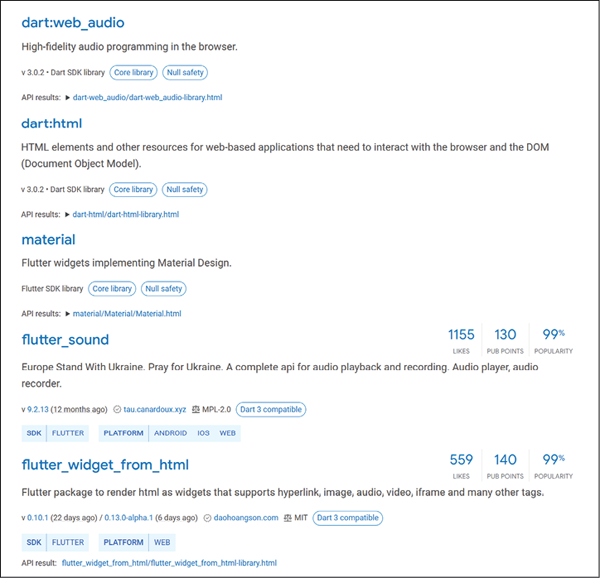
Figure 6.2: More search results for the query "audio" on pub.dev.
Core libraries
flutter_sound
flutter_widget_from_html
There are several more search results on the page, and several pages of search results in total. However, the very next search result looks promising (figure 6.3):
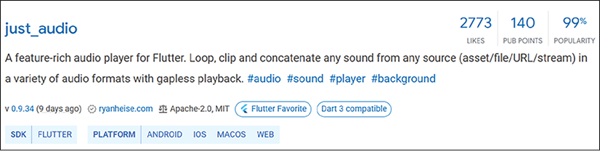
Figure 6.3: The pub.dev search result listing for the just_audio package.
just_audio package, like the flutter_sound package, has the maximum number of Pub Points, was updated within the past couple of days, supports Dart 3, and has an incredibly popular rating. Where it sets itself apart is the enormous number of likes and the Flutter Favorite badge. Good thing we did not stop looking when we found flutter_sound, because just_audio looks like it is an even better choice!The package page
Now that we have found the package we want to use, let us explore it a bit further. To start, let us look at the package page (as shown in figure 6.4). You can find this on your own by navigating to https://pub.dev/packages/just_audio.
Here, we can find a slew of useful information about the package. At the top, we see the package name and current version. (There is even a handy copy icon next to the version, which will copy the line we need to paste into our pubspec!). It tells us the last time the version was updated, the developer, and all the useful bits about Dart 3 support, being a Flutter Favorite, the supported platforms, and so on:
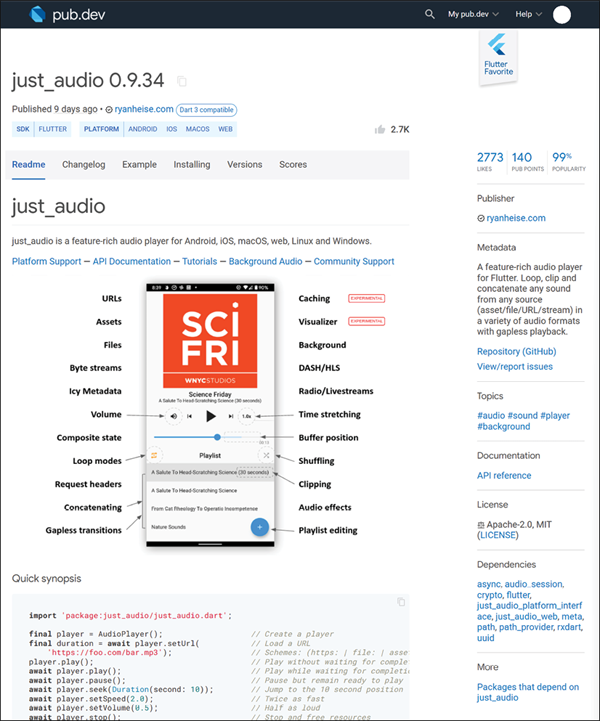
Figure 6.4: The package details page for the just_audio package on pub.dev.
The tabbed view below defaults to the package's readme, which has even more useful information:
Other useful information on this page can be found on the right sidebar, where you can see links to the homepage, GitHub repository (in case you would like to browse the source code), and a place to see/report any issues with the package. There is also a complete API reference, which covers the entirety of the package and how to use every aspect of it (although, in the case of just_audio, the relevant information is on the readme tab, so the API reference simply displays this information.)
Try it yourself
flutter pub get once you have added the dependency!Popular Pub packages
There is no shortage of packages on Pub. Sometimes the most difficult part of choosing a package is even knowing what is even available and what other people are using to solve problems. If you have already visited pub.dev, you will no doubt have noticed the most popular packages and top Flutter packages sections on the home screen (figure 6.5). (There is also a top Dart packages section if you are looking for something specific to Dart.)
This is an excellent place to start browsing packages that other developers are commonly using. Sometimes inspiration for a new application or feature can come from just browsing these lists. You might even discover a solution to a problem you did not know you were having!
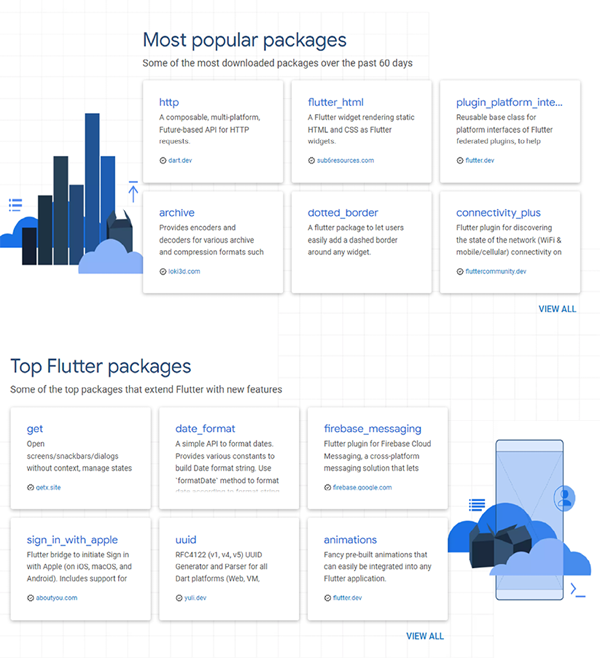
Figure 6.5: Popular packages on pub.dev.
Let us look at a couple of the most popular packages to understand what problems other developers are trying to solve.
shared_preferences
Have you ever thought it might be useful to store some user data on the device? Maybe you are storing the user's preference for a light/dark mode. Perhaps you want to keep track of how many times they have opened the application. Maybe you want to store user-generated content (such as a list of items) so that it is available next time the app is launched. If you have answered yes to any of these questions, look no further than shared_preferences!
With shared_preferences, you can store integers, Booleans, doubles, strings, and lists of strings to a user's device with ease. Then, you can easily recall those values later. It works on all platforms that Flutter can target.
shared_preferences, do not expect the same data to be available on multiple devices that the user uses.url_launcher
If you want to have a tappable email address which automatically launches the user's email client and pre-fills the to, subject, and body lines, look no further than url_launcher! Why stop at emails, though?
Website
Phone
SMS
File
All of this is possible on every platform that Flutter targets.
dio
The default HTTP client that comes with Dart is usually good enough for most tasks. However, there are times when you need to do something that the built-in client just cannot handle. This is where dio comes to the rescue!
Global settings
dio to configure global settings for all HTTP connections made within your application, such as setting an authorization header.Interceptors
If for whatever reason you find that Dart's HTTP client is not quite doing the trick, look at Dio. You will be glad you did.
flutter_bloc
Stateful widgets can only get you so far in life. The minute a stateful widget is disposed of the state is lost. That might be fine for some use cases, but other times you might need to save that state. You could be building a list/details application. When viewing the details, you have got the option to update the title. Save the changes by passing the updated details to a BLoC, and the list will rebuild automatically.
A lot of business logic can be moved outside the widget's build method by using a BLoC, as well. By leveraging the event-driven nature of the BLoC, you can send an event to the BLoC (sometimes with parameters), allow the BLoC to do the heavy lifting, and then the BLoC will return a given state. That state can be used to build your widget in a different way. For example:
Send an event
Sending an event of load all the things to the bloc would trigger the BLoC to reach out to an API and acquire some data.
Process the data
Then, the data would be processed.
Return a state
If successful, a state of all good! could be sent back; otherwise a state of that did not quite work out could be sent instead.
Build the widget
When the widget is built, it could check for the success/failure states and either return the details of the response or an error message.
And we are only scratching the surface of what flutter_bloc can do! In fact, we are going to discuss it in-depth in Chapter 9: State Management and the BLoC.
isar
If you have found yourself using shared_preferences and realizing the limitations of what you are able to store and how you can retrieve it, you need isar. This package is an easy-to-use NoSQL database for storing and retrieving any type of data imaginable. It is easy to use, fast, and has excellent documentation. The limitations of shared_preferences are a thing of the past with isar!
isar's maintenance before depending on it. When this page was written (November 2026), its latest stable version on pub.dev, 3.1.0+1, had been published three years earlier, with only 4.0.0-dev prereleases after it (pub.dev, n.d.-b).Package of the Week
This is just a small sampling of some of the more popular packages which can be found on Pub.
Conclusion
We have covered a lot of ground in this chapter. By now, you know what pubspec.yaml is and how to use it to add packages and resources to your application. You learned how to find and evaluate the quality of packages using Pub, the package manager for Flutter and Dart, and pub.dev, the website where all the available packages can be found. Then, we learned how to make our application play sounds. Finally, we explored a small selection of some popular packages that many developers come back to time and time again.
How are you feeling about all this new information? If you are overwhelmed, that is perfectly okay. Take a break, stretch, drink some water, and come back to it when you are ready. Or are you feeling confident that you are really starting to get a good grasp on Flutter? That is great!
async await some new concepts!Questions
- What is
pubspec.yamlused for? - What language is
pubspec.yamlwritten in? - What are the required directives for Flutter in
pubspec.yaml, and what do they do? - How do you update the package versions in
pubspec.yamlwith a single command? - How do you add images, fonts, sounds, or other assets to your application?
- What is Pub?
- How does dependency version pinning work?
- Where can one browse a list of packages that are available to add to a Flutter or Dart project?
- What are Pub Points and how are they calculated?
- How can one save a list of their favorite packages on Pub?
- How can you play audio in your Flutter application?
- Where can you find a list of popular Flutter and Dart packages?
- What are some ways in which data can be persisted across app launches?
- What YouTube playlist does the Flutter team use to showcase popular packages?
Key terms
pana, which is used to loosely determine the quality of a given package.Command reference
pubspec.yaml file and caches them locally for use in your application.pubspec.yaml with the newest available versions of packages within their allowed version ranges.pubspec.yaml with the newest available versions of packages, even if those new versions have a version available outside of the allowed version ranges.flutter pub upgrade resolves the newest allowed versions and writes them to the lockfile ("it writes a lockfile to ensure that dart pub get will use the same versions"); it leaves the constraints in pubspec.yaml as they are. Only --major-versions "Also updates pubspec.yaml with the new constraints" (Dart, n.d.-c). The pub outdated reference lists no --major-versions option; its options are --[no-]dependency-overrides, --[no-]dev-dependencies, --json, --[no-]prereleases, --[no-]transitive and --[no-]up-to-date (Dart, n.d.-d).Further reading
References
- Dart. (n.d.-a). The pubspec file. Retrieved from Dart: https://dart.dev/tools/pub/pubspec (added, not in the book)
- Dart. (n.d.-b). Package dependencies. Retrieved from Dart: https://dart.dev/tools/pub/dependencies (added, not in the book)
- Dart. (n.d.-c). dart pub upgrade. Retrieved from Dart: https://dart.dev/tools/pub/cmd/pub-upgrade (added, not in the book)
- Dart. (n.d.-d). dart pub outdated. Retrieved from Dart: https://dart.dev/tools/pub/cmd/pub-outdated (added, not in the book)
- Flutter. (n.d.). Adding assets and images. Retrieved from Flutter: https://docs.flutter.dev/ui/assets/assets-and-images (added, not in the book)
- pub.dev. (n.d.-a). Scoring. Retrieved from pub.dev: https://pub.dev/help/scoring (added, not in the book)
- pub.dev. (n.d.-b). isar. Retrieved from pub.dev: https://pub.dev/packages/isar (added, not in the book)
Handling User Input
Buttons, text fields, pickers, radios, checkboxes, switches and sliders in Material and Cupertino, plus validating and submitting input with a Form.
Working with APIs and Asynchronous Operations
Futures and async/await, requesting and sending data with the http package, turning JSON into Dart classes, FutureBuilder and StreamBuilder, and sinks and streams.