Your Road Ahead
Your Road Ahead
In this final chapter, we are going to talk about what you can do to prepare for your new job, as well as look at how to collaborate with a software development team, what skills you will need to learn on your own that were not covered in this book, and we will look at some suggestions for furthering your career as a Flutter developer.
Chapter overview
Structure
- How to prepare for your new job
- Tips for collaboration with other developers
- Additional skills you will need to seek out
- Suggestions for furthering your career
Objectives
How to prepare for your new job
It is very easy to get burned out when doing software development. Whether it is working long hours by choice or because you are pushing to get the latest release out, at some point, we have all worked a bit later than we wanted or expected to. This might be fine occasionally, but repeatedly working extended hours is what leads to burnout.
Your employer never wants you to reach a stage of burnout because your productivity will drop to near zero. It is also a miserable thing to experience, so you should try to avoid it at all costs. By not working more than you need to (for example, by not working before you start work), you will help prolong the amount of time you can work before starting to feel the first hints of burnout.
Your first days on the job
Once you have started your new job, after all the paperwork is finished and your laptop is set up with the tools you will need to do your job, there are a few things to get familiar with.
The existing codebase
README file in the repository, or on some internal documentation website or application. You do not have to understand everything, but having a basic familiarity with the concepts will help you spin up quickly.The development process
Your team
Your tools
Learn about the roles and responsibilities of those you will be working with and any special considerations to keep in mind. (Maybe they prefer they/them/their pronouns or would rather talk on the phone than over the company chat platform). Software development is a collaborative process, and getting to know your team is key to success. It will help you figure out who to turn to when something goes wrong (either with your code or with the product) and getting to know your team will help build trust with them, which is vital when working under pressure.
Consider investing in a nice mechanical keyboard and high-end mouse if you have not already. Since you will be sitting most of the day, consider investing in a high-end office chair. Even better, consider a sit-stand desk and anti-fatigue mat.
Be sure to take notes as you begin this new chapter of your life. Someday, you will find yourself in a position where you will either need to refer to them to do your job, or you will be far enough along in your career that you will want to share the knowledge and wisdom with others. Starting on your first day, keep a notebook of important things you have learned and refer to it often.
Tips for collaboration with other developers
Many software development teams work with either a Scrum/Agile framework or a Waterfall methodology. These are two different styles of organizing a team and defining a process around the work that needs to be done. Whether your team operates under one (or a hybrid of both) of these methods or your team lacks structure (and might benefit from these methodologies), it is worth your time to understand them. Let us look at each of them to see where your team might fit in.
Agile and Scrum
We will start by looking at the Agile framework using the Scrum methodology (figure 15.1). The idea behind this methodology is that it helps to organize the large amount of work that needs to get done by breaking it down into small pieces. There is a continuous feedback loop happening, which enables experimentation and iteration. Scrum teams are generally small — usually fewer than 10 people — and are led by a Scrum Master.
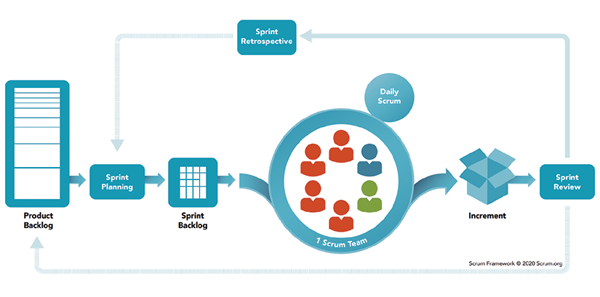
Figure 15.1: The Scrum process. Source: https://www.scrum.org/resources/what-is-scrum
Sprints
Epics and Stories
Stand-ups
Sprint Review
Sprint planning
Story Grooming
- Daily Scrum. The stand-up is a fixed daily event, not "two to three times per week": "The Daily Scrum is a 15-minute event for the Developers of the Scrum Team", held "at the same time and place every working day of the Sprint."
- Review and Retrospective. These are two separate events, not two names for one meeting. "The purpose of the Sprint Review is to inspect the outcome of the Sprint and determine future adaptations"; "The purpose of the Sprint Retrospective is to plan ways to increase quality and effectiveness." What the book describes (what worked well, what to avoid) is the Retrospective.
- Grooming. The guide does not use the word "grooming"; it calls this activity Product Backlog refinement: "the act of breaking down and further defining Product Backlog items into smaller more precise items."
This only scratches the surface of what it is like to work on a Scrum team. If you would like to learn more about the Scrum methodology, check out the guide available at https://scrumguides.org/ or a brief introduction at the official Scrum website, which you can find here: https://www.scrum.org/resources/what-is-scrum.
Waterfall
Next, we will look at the Waterfall methodology (figure 15.2). This methodology differs from Scrum in several key aspects. First, each process of the Waterfall is completed before moving on to the next. Rather than a continuous flow of Stories from the backlog being added to the development cycle, all Stories are created and defined up-front. Then, they are worked on until all of them are completed:
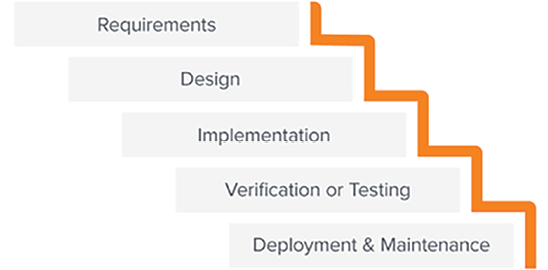
Figure 15.2: The waterfall methodology. Source: https://business.adobe.com/blog/basics/waterfall
Requirements
The waterfall process starts by gathering all the requirements for the project and fully understanding them before any work continues. The project manager will do much of this work before bringing it to the rest of the team as a written document.
Design
Once the requirements have been laid out, the team will discuss the design of the solution: what are the data classes which will need to be created? What does the data flow look like? How will the software be designed?
Implementation
Once a complete, logical representation of the entire application is built, the team will then move on to implementing the solution they have laid out. If the design they came up with is not working or requires significant changes, they will stop development and move back to the design phase.
Testing
Once the application has been fully implemented, it needs to be tested. This is where bugs are found and fixed, and an analysis of the final solution against the initial requirements is done. The project manager, in the requirements document, will have created user use cases. Those use cases can be used as a basis of evaluation to ensure the application does precisely what is required of it.
Release
Finally, the application will be released to the end user(s). Feedback in the form of bug reports and feature requests will begin to flow in, and the development team will need to respond to those requests.
To learn more about the Waterfall method, check out the following link: https://management.org/waterfall-methodology.
However, it is not all you need to know about working on a team. You will also need to learn how to contribute to the codebase.
Additional skills you'll need to seek out
Version control
As we have touched on throughout this book, you will need to have a solid understanding of whichever version control system (VCS) your team uses. The most popular these days is Git; however, there are others, such as Mercurial (hg) and Subversion (svn). These systems allow a team to contribute to the same source code independently while maintaining a history of changes (called a changelog).
Figure out what VCS your team is using and seek out the documentation for it. You will need to spend time learning how to:
- clone the repository,
- create a branch to do your work in,
- commit code to the branch,
- push your code up to the online repository,
- create a pull request — that is, a request for your colleagues to review and comment on your code before merging it with the main codebase.
Your mentor can help guide you through some of these advanced scenarios as they come up, but having a basic familiarity with the tools you are using is likely an expectation that your team has of you. Take the time to do some research because no matter what type of code you are writing, if you are collaborating with others, you will need to understand these concepts.
Testing
You will also need to understand how to properly test your code. We did not cover writing tests in Flutter in this book, but that does not mean it is not vitally important to understand. When it comes to writing tests, there are several types in Flutter: widget tests, unit tests, BLoC tests, integration tests, and golden tests.
Widget tests
Unit tests
BLoC tests
Integration tests
Golden tests
Learning about version control systems and testing your code is a great start for the additional skills you will need to seek out as you grow and flourish in your new role. However, they are far from the only skills you will need to learn.
Animations
At some point, you will likely be asked to create animations in Flutter. Flutter has a wide variety of widgets available to help construct any type of animation you could possibly imagine. However, with so many options and so much complexity, you may wish to take a quick course to learn how to create animation in Flutter.
CustomPainter widget. The course is inexpensive and relatively short. Readers of this book may use code JOBSEEKERS for 25% off at checkout. It is well worth your time, especially as you look to further your career.CustomPainter is not a widget. It is "The interface used by CustomPaint (in the widgets library) and RenderCustomPaint (in the rendering library)" (https://api.flutter.dev/flutter/rendering/CustomPainter-class.html); you subclass it and pass it to the CustomPaint widget, "A widget that provides a canvas on which to draw during the paint phase" (https://api.flutter.dev/flutter/widgets/CustomPaint-class.html).Speaking of furthering your career…
Suggestions for furthering your career
Your new job is the first step in your career as a Flutter developer. Flutter is a rapidly evolving framework, resulting in several rewrites of chapters in this very book before its completion. In fact, by the time you are reading it, there are likely to be other parts of this book that are no longer accurate! You will want to stay up to date with all the goings on of Flutter as it continues to grow and evolve.
Flutter Public Announcements
Flutter on YouTube
Join the community
The Flutter developer community is one of the warmest, most welcoming developer communities around, and you should be a part of it! Whether you are on Matrix, Discord, Slack, Reddit, or any other platform you can think of, there is a place for you.
- Do you identify as female or non-binary? If so, you may be interested in joining the Flutteristas (https://flutteristas.org/).
- Maybe you are interested in joining a meetup to talk about Flutter with other developers in your area? If so, check out https://www.meetup.com/pro/flutter/.
Whichever platform you choose to engage in, no matter where it is, keep in mind the culture of the Flutter community (https://flutter.dev/culture). Networking with the Flutter community will open new opportunities for growth, as well as new job opportunities. Consider how you can contribute to new Flutter developers' growth as you grow in your own career.
Keep growing
Remain humble
Contribute to open source
Look beyond your domain
Conclusion
This book was quite an adventure. Together, we learned about the history of application development, why Flutter was created, and some of the history of its development. We learned a whole host of concepts, from what a widget is to what is involved in the technical interview, and everything in-between. Whether you began this journey as a seasoned software developer with years of experience or were simply curious about getting started with app development, hopefully the concepts contained within this book were helpful to you. If you just landed your first job as a Flutter developer, a heartfelt congratulations are in order! (In that case, consider sharing this book with someone whom you feel could benefit from it!)
Wherever your journey takes you from here, thank you for purchasing this book.
Flutter community links
Join the Flutter community on: